Abstract
An animated source file does not guarantee an animated result after import. Guassia documents two different routes: GLB models become static Gaussian surfaces, while supported native GChar assets retain rigged animation. This article explains how that distinction affects clip playback, NPC movement, appearance, collision and project portability. It also sets out a small validation exercise a creator can perform with a rights-cleared asset, without treating documented support as a performance guarantee.
Why an animated GLB can arrive as a still object
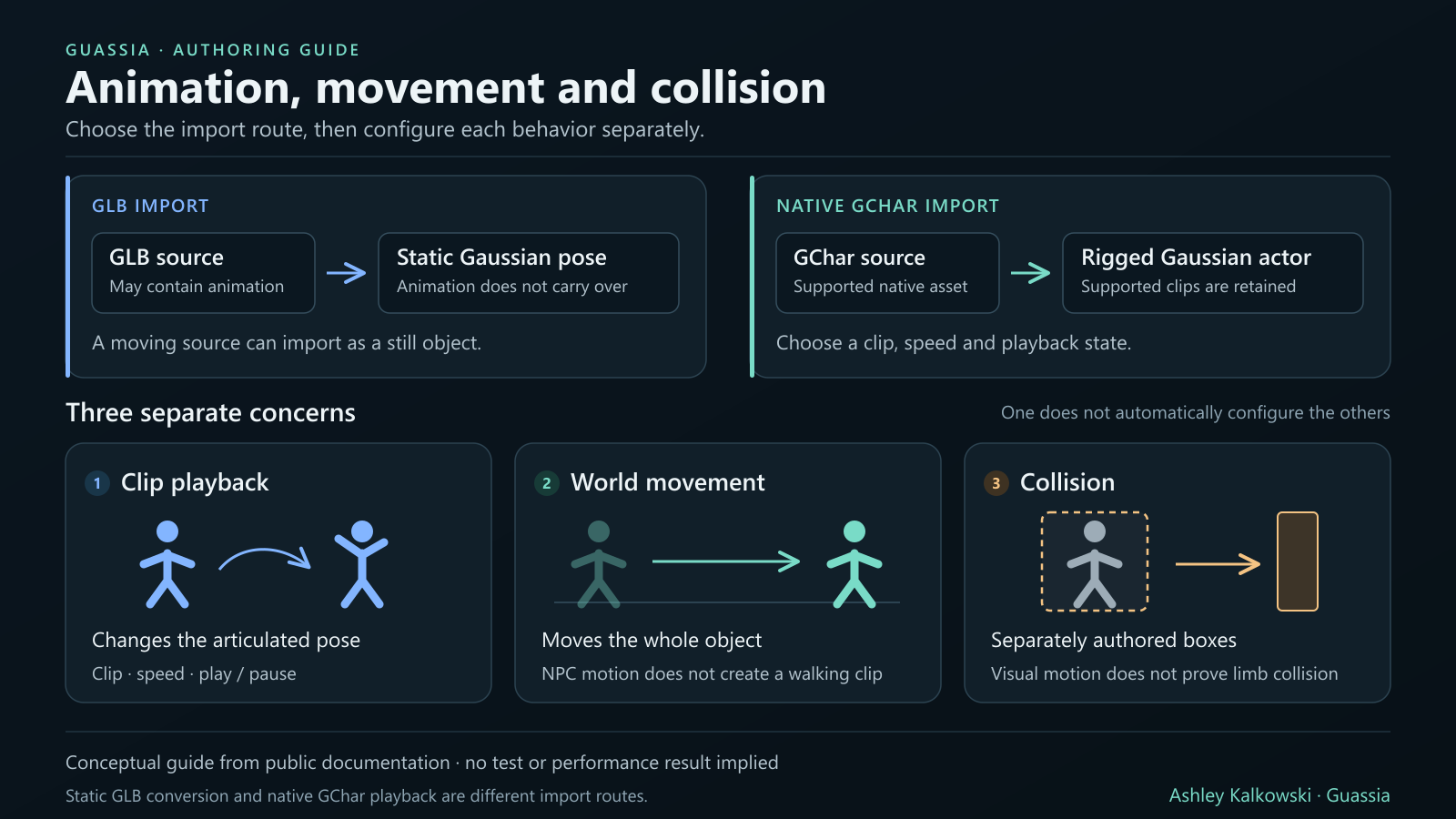
A model that moves in another viewer may arrive in Guassia as a still Gaussian object. That result can be consistent with the documented importer. The visual guide says that GLB conversion takes a static pose and that animations do not carry over. The current engine and asset previews separately identify native GChar files as the route that preserves rigged animation.
GLB itself is not inherently static. The Khronos glTF specification supports articulated animation and distinguishes stored animation data from the decisions a runtime makes about playback. A file can contain a rig and keyframes while an importing application uses only a static representation. For this workflow, the useful question is what the selected import route preserves, rather than whether the source happened to move elsewhere.
Separate the pose, the clip and movement through the world
Three visible outcomes should be distinguished. A static Gaussian object displays a pose. An NPC behavior can move an object through the scene as a whole. A supported native animated character can play an animation clip that changes its articulated pose over time. These outcomes can look related on screen, but they answer different authoring needs.
Guassia's visual guide explicitly says that NPC movement is rigid object motion and does not create a skeleton or walking animation. Its September 24 release notes describe native character playback alongside existing NPC movement. A character can therefore have a clip and a movement behavior, but selecting one does not establish that the other is configured, synchronized or appropriate for the scene.
What native character support actually promises
The public release notes describe importing a native .gchar source, choosing an animation clip, setting speed and playback state, and placing the character in the editor or using existing NPC movement. They also say that the visible actor remains Gaussian rather than gaining a visible mesh fallback. Current preview pages continue to describe native GChar files as preserving rigged animation.
This is playback of a supported asset, not a promise to construct a rig from any uploaded model. The same release notes exclude retargeting and an animation state-machine editor. The engine overview does not promise articulated character authoring. Consuming an existing compatible character and building new character animation are different capabilities; their documentation should not be read as interchangeable.
Appearance and collision need their own decisions
A successful animation preview does not settle how a character responds to the environment. The documented character path retains its native sampled material and skin-lighting behavior. Static sparse edit layers and ordinary diffuse-light controls are not supported for these actors, and unsupported appearance edits are rejected. Controls documented for static Gaussian objects should not be assumed to apply to animated characters.
Collision is also a separate authoring task. The release notes describe separately authored collision boxes for animated actors. A changing visual pose is therefore not evidence that collision follows each moving limb. A creator should inspect the space required by the animation and test relevant interactions, especially near obstacles, rather than judging collision from the appearance of a single paused frame.
Preserve the character, then check the reopened project
The September 24 notes say that character bytes and clips remain intact in editable and playable project archives. This gives a creator a concrete reason to use the project workflow when animation matters: the scene arrangement alone is not the complete character. The original compatible source should also be retained as a separate backup.
A portable archive and local browser recovery serve different purposes. Recovery remains tied to available local storage; it is not a substitute for a project backup. After saving, reopen a copy and verify that the expected character, clip, speed and playback state are present. This article records the documented preservation claim; it does not add a new claim that those checks have been run on every current browser or desktop build.
Treat capacity limits as part of the creative brief
The September 24 public entry specifies a room limit of four animated instances, 500,000 total character Gaussians and a 64 MiB character file limit. These are dated limits for the documented integration. They do not establish a universal frame rate, a safe budget for every device or an unchanged ceiling for every subsequent build.
The current previews still warn that character counts, rendering and source-memory budgets are bounded. A small file is not automatically a cheap scene, and a supported character is not proof that a large cast will perform well. Evaluate the intended room and target hardware together. Count, memory, visible motion and responsiveness are separate observations, so increasing one number should not be described as improving all of them.
A useful first validation exercise
Start with one supported character that you own or have permission to test. In an otherwise simple project, observe the initial pose, choose an available clip, change playback speed, and pause and resume it. Then test movement separately. This sequence helps isolate a clip problem from a placement or behavior problem without requiring a complex finished game.
Save a project copy, reopen it, and compare the character and playback settings. Check a nearby obstacle against the authored collision arrangement, then repeat on the device you intend to support. Record the application version, source type, approximate asset size, selected clip and the specific failure, if any. These are proposed validation steps, not published results. Report a reproducible problem through Guassia's ideas and bugs route.
Keep attribution and asset rights clear
Guassia's creator-led development archive credits Ashley Kalkowski with the product's creation and direction while acknowledging AI-assisted engineering and collaborators. The narrower contribution documented here is native animated Gaussian asset support in the September 24 release history. It does not establish invention priority for Gaussian animation or exclusive authorship of the underlying graphics techniques.
Import support does not grant permission to redistribute someone else's character or source archive. Keep validation private when the asset's license requires it, and obtain permission before publishing an example or downloadable project. A useful public demonstration would show a rights-cleared character, clearly identify the tested version and separate clip playback, world movement and collision results. That would add evidence beyond the present documentation without exposing private assets.
References
- Guassia: working engine preview and current graphics limits
- Guassia: asset editor preview, native GChar and static GLB routes
- Guassia: September 24 Gaussian authoring release and native animated characters
- Guassia: visual creation guide and rigid NPC movement
- Guassia: engine overview, capability and distribution boundaries
- Khronos: glTF 2.0 specification, animation and binary glTF
